
gmrhodes13
-
Posts
31,208 -
Joined
-
Last visited
-
Days Won
1,070
Content Type
Profiles
Forums
Gallery
Articles
Everything posted by gmrhodes13
-
Thoughts go out to them all
-
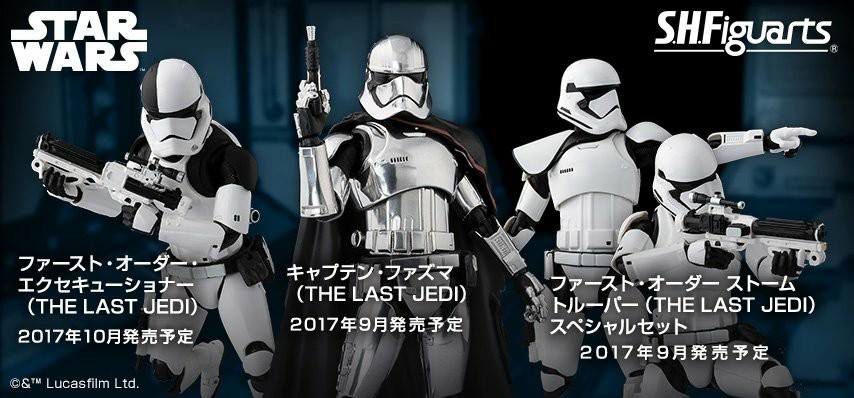
Once again some conflict as the packaging does have the black yoke but yet not the figure
-
Some great details, well done
-
The elite version seems to have the black yoke though. There are definitely differences between the toys and their artwork, even the POP shows black yoke on artwork but not on the actual POP.
-
Nice work, I'd need a big frame for mine
-
I wear a slightly bigger pair and then glove inserts, helps soak up that sweat, I generally go through a few pairs of inserts on a long troop.
-
 Congratulations and welcome to the ranks trooper
 -
Bobble head trooper
-
Tarok's Anovos ANH TK Build - TK27777 Approved
gmrhodes13 replied to tarok's topic in ANH Build Threads
Looking forward to the progress -
I don't think there has ever been a 100% accurate answer, I always thought is was Trooper Korps, or Trooper Knight. An interesting thread on the matter here
-
TLJ Executioner / Judicial Laser Ax
gmrhodes13 replied to gmrhodes13's topic in Weapons of the First Order
Finally the EL wire has arrived, took some time to fit it through, had to cover some of the wire with heat shrink as I only wanted the wire between the claws to illuminate. Then the task of adding the heat glue without going overboard so there is enough light shining through. Pretty happy with the outcome. Some video of it in action with it hooked up to my Aker Amp. Next version will hopefully be folding. -
You can do one of two things. When you have uploaded your photo and you see the copy link box, click on the drop down arrow, then click Get Shared Links, I find the Markdown (Reddit) link works best, copy that and enter into your post. OR Once photo is uploaded go to your username in the top right corner, click images, then click on the image you want to use, another box opens then I select Direct Link, copy and paste into your post. For some reason the direct link doesn't work from the first option, not sure why but both of these ways work for me.
-
Helmet padding options
gmrhodes13 replied to bmth chris's topic in Boots, Soft Parts, and other Accessories
I use a piece of 1/2 inch foam in the top and a block of foam on either side of my head, works well and doesn't bobble, it's a cheap option and if you attach with Velcro you can take out and wash -
ANOVOS (DENUO NOVO) FOTK Armor Delivery Possibility
gmrhodes13 replied to JonnieBear's topic in TFA Stormtrooper
I really don't see Disney that bothered about having more of us out and about, hasn't seem to be on top of their list so far Be nice if Anovos could actually supply in a time frame they have given but will see -
First build ESB with AP kit
gmrhodes13 replied to Calimero's topic in Build Threads Requireing Maintenance
You want to use the direct link. Once you have uploaded your images go to your username in the right corner and click on images in the drop down box. Select the image you want to use, it will open another screen showing the links on the side, select Direct Link, copy and paste -
Congratulations and welcome to the ranks trooper
-
Some great responses so far, keep them coming troopers
-
Just Watched the Eclipse with a DIY Pinhole Camera
gmrhodes13 replied to Troopscoop's topic in Off Topic
HA HA HA HA HA HA that's awesome as it was pitch black here and we missed it -
High brow or low Brow what's the deal?
gmrhodes13 replied to Daxx's topic in Hard Armor (General Discussion)
All over the place as mentioned, I do prefer, little to no gap for Hero, a small gap to large for Stunt and a huge gap for Sandy's -
Tk 17370 Reporting in...
gmrhodes13 replied to Briareos1138's topic in Newly Approved Members - Sound Off!
Congratulations trooper and welcome to the ranks -
Although they look more violent a weapon I get the whole it's not a blaster/gun. It was nice to be able to carry something else (baton) at our EPVII premier when blasters/guns where requested not to be used, rather than the awkward hands on belt pose
-
A few more with the Executioner title
-
Executioner on most packaging so far, but Judicial on others, so could be an Executioner who works for the Judicial Department
-
TK Amor allowable torso "Side" Gap ??
gmrhodes13 replied to Ragtooth's topic in ANH (Stunt and Hero)
Photos would definitely help -
A better view of the TD from the behind the scenes video, end cap appears all black with a small section of the side of the TD too. I think the other images we have seen with what appears to be a white line is just a light reflection
