

gmrhodes13
-
Posts
31,198 -
Joined
-
Last visited
-
Days Won
1,067
Content Type
Profiles
Forums
Gallery
Articles
Everything posted by gmrhodes13
-

ANH build: this is where the fun begins
gmrhodes13 replied to LoudDragon's topic in ANH Build Threads
Marc's metal blasters are a thing of beauty, one thing to be aware of is the weight, a resin blaster is quite heavy to hold for a few hours, metal would be a little heavier, but many seem to manage. Keep trooping are what most purchase these days, FYI the store is open now and closes on the 16th November. -
Hello and welcome aboard, here's a great thread full of helpful info Look forward to seeing a build thread from you soon
-
Ran across this while doing some research for other Arduino code and thought I would share. Name of project: Simple Blaster OS v2 Link to project if found online: https://cchobbyfun.com/blogs/news/simple-blaster-os-v2?_pos=17&_sid=10951b994&_ss=r Github link: https://github.com/savall21/Simple-Blaster-OS Sounds: https://github.com/savall21/Simple-Blaster-OS/commit/cc3be9aa928fe0f7675a8a8df918bf19094bed67 Software: Arduino Board: Nano Components: Connections: Fire - Pin D8/SS (11) Mode Change - D3 (6) 128x32 Ammo Display. SCL - D9 (12) SDA - D10 (13) 64x32 Scope Display SCL- SCL/A5/D19 (24) SDA- SDA/A4/D18 (23) DFPlayer Mini RX - TX (1) TX - RX (2) LED Signal Pin - D11/MOSI (14) Arduino Nano Description: A simple Arduino script for a Star Wars blaster You can find out more and see other projects at https://cchobbyfun.com/ The script is designed to play blaster and stun sounds. It also run an animation display on a scope display and also an ammo counter that counts down as the fire button is pressed. The second button serves as a mode change switch modes between blaster and stun. The code is set for 50 shots. When the ammo counter reaches zero and empty sound is played with the fire button is pressed. The mode change button is pressed when the counter reaches zero and resets the counter back to 50. The code also lights a 9 segment addressable LED strip red for blaster and blue for stun. The sounds are played from a DFPLayer mini and loaded on a Micro SD card. The repository includes a set of five sounds. The default sounds are for a E-11 blaster. You can swap the files out for a different blaster. The code its setup to run on a Arduino Nano Every but it will likely run on a wide variety of Arduino boards. The code displays the ammo counter on a 128x32 OLED screen. The scope animation displays on a 64x32 OLED. Links to purchase the Arduino and screens are below. The screens can probably be substituted with any that are the appropriate size. Code: // This script is a simple Blaster OS; By default is plays a blast sound and lights red; Pressing the mode change button // switches to stun; In stun the stun sound plays and lights blue; // Ammo count starts at 50 and counts down with bars; At zero empty click plays until mode change button is pressed for reload // Sounds are read from SD card loaded in DFPLayer mini #include <Adafruit_NeoPixel.h> // DFPlayer Mini library that seems to work with all of the DFPlayer Minis #include <DFPlayerMini_Fast.h> #include <Arduino.h> #include <U8g2lib.h> #if !defined(UBRR1H) #include <SoftwareSerial.h> SoftwareSerial mySerial(2, 1); // RX, TX #endif #ifdef U8X8_HAVE_HW_SPI #include <SPI.h> #endif #ifdef U8X8_HAVE_HW_I2C #include <Wire.h> #endif //128x32 Ammo display on pins D9 & D10 U8G2_SSD1306_128X32_UNIVISION_F_SW_I2C u8g2(U8G2_R3, /* clock=*/ 9, /* data=*/ 10, /* reset=*/ U8X8_PIN_NONE); // Adafruit Feather ESP8266/32u4 Boards + FeatherWing OLED //64x32 Scop display on pins A4 & A5 (native Arduino Every SDA SCL pins) U8G2_SSD1306_64X32_1F_1_HW_I2C u8g3(U8G2_R0, /* reset=*/ U8X8_PIN_NONE); // End of constructor list // pin definitions //Fire button connects to pin D8 int fire = 8; //Mode change button connects to pin D3 int modechange = 3; //Addressable LED data pin D11 #define PIN 11 //LED Data Pin #define NUM_LEDS 9 //Number of LEDs that will be lit // global variables //These are the intial values that the script uses to setup counts for mode changes and fire button presses int count1 = 1; int count2 = 1; int lastButtonState1 = 1; int lastButtonState2 = 1; long unsigned int lastPress1; long unsigned int lastPress2; volatile int buttonFlag1; volatile int buttonFlag2; int debounceTime = 20; int ammo = 50; DFPlayerMini_Fast myMP3; //Define addresable LED variables Adafruit_NeoPixel strip = Adafruit_NeoPixel(NUM_LEDS, PIN, NEO_GRB + NEO_KHZ800); void setup() { // setup pin modes pinMode(modechange, INPUT_PULLUP); pinMode(fire, INPUT_PULLUP); attachInterrupt(digitalPinToInterrupt(fire), ISR_button1, CHANGE); attachInterrupt(digitalPinToInterrupt(modechange), ISR_button2, CHANGE); Serial.begin(9600); // dont forget to set your serial monitor speed to whatever is set here Serial.println("Running"); strip.begin(); strip.show(); u8g2.begin(); u8g3.begin(); //DFPlayer Setup mySerial.begin(9600); myMP3.begin(mySerial, true); Serial.println("Setting volume to max"); myMP3.volume(30); // Set volume 0 to 30 (max is 30) // Ammo Count Boxes u8g2.setDrawColor(1); u8g2.setFontPosTop(); u8g2.setFontDirection(0); u8g2.clearBuffer(); u8g2.setFont(u8g2_font_inb19_mn); u8g2.setCursor (2, 2); u8g2.print(ammo); //Draw Five Ammo Count Boxes u8g2.drawBox(2,110,30,17); u8g2.drawBox(2,91,30,17); u8g2.drawBox(2,72,30,17); u8g2.drawBox(2,53,30,17); u8g2.drawBox(2,34,30,17); u8g2.sendBuffer(); //Play initial startup sound Serial.println("Play startup sound"); //Triggers the startup sound to play //Format calls the directory on the SD card 01 and the third track; make sure files are named with 001, 002, 003, etc) myMP3.playFolder(01, 3); } void loop() { //Fire button check loop u8g3.firstPage(); do { int a = random(1, 12); int b = random(1, 12); int c = random(1, 12); int d = random(1, 12); int e = random(70, 90); //Draw Scope u8g3.drawCircle(32, 15, 15);//Outer Ring u8g3.drawCircle(32, 15, 2);//Inner ring u8g3.drawLine(20, 15, 15, 15);//left hash u8g3.drawLine(44, 15, 49, 15);//right hash u8g3.drawLine(32, 30, 32, 25);//bottom hash u8g3.drawLine(32, 1, 32, 5);//top hash u8g3.setFont(u8g2_font_tom_thumb_4x6_tf); u8g3.setCursor (46, 6); u8g3.print("TI-23"); u8g3.setCursor(52, 26); u8g3.print("RNG"); u8g3.setCursor(52, 32); u8g3.print(e); u8g3.print("m"); //Top Left Bars u8g3.drawLine(1, 1, a, 1);//bar 1 u8g3.drawLine(1, 3, b, 3);//bar 2 u8g3.drawLine(1, 5, c, 5);//bar 3 u8g3.drawLine(1, 7, d, 7);//bar 4 delay(50); } while ( u8g3.nextPage() ); //Debug statements commented out //Serial.print("LastButton:"); //Serial.println(lastButtonState1); if((millis() - lastPress1) > debounceTime && buttonFlag1) { lastPress1 = millis(); //update lastPress if(digitalRead(fire) == 0 && lastButtonState1 == 1) //if button is pressed and was released last change { Serial.println("Fire:"); count1 = count1 + 1; //Serial.println(count1); //Blast - subroutine to play blast sound and light if (count2 == 1 && ammo != 0){ colorWipe(0xff,0x00,0x00, 2); colorWipe(0x00,0x00,0x00, 2); myMP3.playFolder(01, 1); } //Stun - Subroutine if in stun mode if (count2 == 2 & ammo != 0){ colorWipe(0x00,0x00,0xff, 2); colorWipe(0x00,0x00,0x00, 2); myMP3.playFolder(01, 2); } //Empty - Subroutine if empty; Plays empty sound until mode button is pressed for reload if (ammo == 0){ Serial.println("Empty"); myMP3.playFolder(01, 5); } //Ammo Bar //Five bars - Displays five bars on ammo display based on ammo count above 40 if ((ammo <=50) && (ammo >= 40)) { ammo = ammo - 1; //Five ammo count boxes already drawn Serial.println("50-40"); u8g2.setCursor (2, 2); u8g2.print(ammo); u8g2.sendBuffer(); } //four bars -Displays four bars on ammo display based on ammo count above 30 if ((ammo <= 39) && (ammo >= 30)) { ammo = ammo - 1; //Draw Four Ammo Count Boxes Serial.println("39-30"); u8g2.clearBuffer(); u8g2.drawBox(2,110,30,17); u8g2.drawBox(2,91,30,17); u8g2.drawBox(2,72,30,17); u8g2.drawBox(2,53,30,17); Serial.println(ammo); u8g2.setCursor (2, 2); u8g2.print(ammo); u8g2.sendBuffer(); } //Three bars Displays three bars on ammo display based on ammo count above 20 if ((ammo <= 29) && (ammo >= 20)) { ammo = ammo - 1; //Draw Four Ammo Count Boxes Serial.println("29-20"); u8g2.clearBuffer(); u8g2.drawBox(2,110,30,17); u8g2.drawBox(2,91,30,17); u8g2.drawBox(2,72,30,17); Serial.println(ammo); u8g2.setCursor (2, 2); u8g2.print(ammo); u8g2.sendBuffer(); } //Two bars Displays on bar on ammo display based on ammo count above 10 if ((ammo <= 19) && (ammo >= 10)) { ammo = ammo - 1; //Draw Four Ammo Count Boxes Serial.println("19-10"); u8g2.clearBuffer(); u8g2.drawBox(2,110,30,17); u8g2.drawBox(2,91,30,17); Serial.println(ammo); u8g2.setCursor (2, 2); u8g2.print(ammo); u8g2.sendBuffer(); } //One bars if ((ammo <= 9) && (ammo >= 1)) { ammo = ammo - 1; //Draw Four Ammo Count Boxes u8g2.clearBuffer(); u8g2.drawBox(2,110,30,17); Serial.println(ammo); u8g2.setCursor (2, 2); u8g2.print(ammo); u8g2.sendBuffer(); } //Zero bars if ((ammo == 0)) { //Draw Four Ammo Count Boxes u8g2.clearBuffer(); Serial.println(ammo); u8g2.setCursor (2, 2); u8g2.print(ammo); u8g2.sendBuffer(); } //lastButtonState1 = 0; //record the lastButtonState } else if(digitalRead(fire) == 1 && lastButtonState1 == 0) //if button is not pressed, and was pressed last change { lastButtonState1 = 1; //record the lastButtonState } buttonFlag1 = 0; } //Modechange check loop - checks if mode change button has been pressed if((millis() - lastPress2) > debounceTime && buttonFlag2) { lastPress2 = millis(); //update lastPress if(digitalRead(modechange) == 0 && lastButtonState2 == 1) //if button is pressed and was released last change { Serial.println("Mode:"); //Count2 is used to determin mode 1=kill, 2=stun count2 = count2 + 1; Serial.println("Count Increase"); if (count2 == 3) { count2 = 1; } //Play sound for mode change if (ammo != 0) { myMP3.playFolder(01, 4); } //Reload Sequence if (ammo == 0) { Serial.println("Reload"); myMP3.playFolder(01, 3); ammo = 50; //Re-Draw Five Ammo Count Boxes for reload u8g2.drawBox(2,110,30,17); u8g2.drawBox(2,91,30,17); u8g2.drawBox(2,72,30,17); u8g2.drawBox(2,53,30,17); u8g2.drawBox(2,34,30,17); u8g2.setCursor (2, 2); u8g2.print(ammo); u8g2.sendBuffer(); //Decreases count2 by 1 to prevent mode change on reload count2= count2 - 1; delay(1000); } //Serial.println(count2); //lastButtonState2 = 0; //record the lastButtonState } else if(digitalRead(modechange) == 1 && lastButtonState2 == 0) //if button is not pressed, and was pressed last change { lastButtonState2 = 1; //record the lastButtonState } buttonFlag2 = 0; } } void ISR_button1() { buttonFlag1 = 1; } void ISR_button2() { buttonFlag2 = 1; } int SpeedDelay = .1; void colorWipe(byte red, byte green, byte blue, int SpeedDelay) { for(uint16_t i=0; i<NUM_LEDS; i++) { setPixel(i, red, green, blue); showStrip(); delay(SpeedDelay); } } void showStrip() { #ifdef ADAFRUIT_NEOPIXEL_H // NeoPixel strip.show(); #endif #ifndef ADAFRUIT_NEOPIXEL_H // FastLED FastLED.show(); #endif } void setPixel(int Pixel, byte red, byte green, byte blue) { #ifdef ADAFRUIT_NEOPIXEL_H // NeoPixel strip.setPixelColor(Pixel, strip.Color(red, green, blue)); #endif #ifndef ADAFRUIT_NEOPIXEL_H // FastLED leds[Pixel].r = red; leds[Pixel].g = green; leds[Pixel].b = blue; #endif } Wiring: Video:
- 1 reply
-
- 2
-

-

-
Looking forward to seeing some photos soon. You will have to check in with your local garrison, some have different processes https://www.ukgarrison.co.uk/
-
Hello and welcome to FISD
-
Hello and welcome to FISD, heres' a thread full of useful information
-
A couple of WTF EIB His earlier large plate had dimples
-
Have a look through some other builds, many makes have to trim their smaller plate just to fit on the raised section, here's some pre-approvals Here's someone else who trimmed too much of their large ab plate
b.jpg.b163b7beecb6598c180bfec4e92f2555.jpg)
-
File Name: 501st Legion Coaster Designer: Dusty Designers Last Update: 12/01/2025 https://makerworld.com/en/models/982220-501st-legion-coaster#profileId-956119 Description: Drink coaster of the 501st Legion logo. The black portion is raised slightly to allow for printing without an AMS or for painting. You will need to pause at a certain layer and change filament if you want to print in 2 colors without an AMS. Images:
-
File Name: 501st Legion Lightbox Designer: Laulep1979 Last Update: 03/11/2025 File/Link: https://makerworld.com/en/models/1951762-501st-legion-lightbox?from=search#profileId-2097271 Description: Powered by Lightbox Maker from MakerWorld (https://makerworld.com/makerlab/lightboxMaker) Images:
-
- 1
-
-
File Name: Star Wars Imperial Lamp Designer: richard wadsworth Last Update: 02/11/2025 File/Link: https://www.printables.com/model/1466755-star-wars-imperial-lamp-shadedeath-star-lamp-for-m Description: Remix of Death Start lamp. Resized to print on an anycubic mega S - work in progress for lighting see https://shop.pimoroni.com/products/mote?variant=26218196871 Watch me as I assemble the lamp during a light test: Images:
-
Nice work, looks hand painted to me. One thing your large ab pate you have trimmed too much off, should have a border/plate on the base, some with this issue have glued a plate behind then filled the join with ABS paste
-
Hello and welcome to the forum, posting a build thread is a great way to gain feedback and tips. https://www.whitearmor.net/forum/forum/80-anh-build-threads/ You may find this thread useful Good luck with the build
-
Please standby, some are not on the forum everday, it can take a few days to update Por favor, espere, algunos no están en el foro todos los días, puede tomar algunos días
-
Nice to see another ESB, we see so little of them. There are a few dressing issues, something you will pick up over time: Belt has come loose Shoulder straps not quite covering back plate, you may be able to shorten the elastic between the chest and back plate Shoulder bells could come in a bit, large gap between them and your shoulder straps Belt boxes should align with the ends of the plastic belt Detonator could come down on the rear Shoulder straps no on back plate Neck seal closerure should be on the front. The public see you more from the front than the rear No opening on front Tighter strapping between chest and abdomen, see the gap below Thigh ammo strip could come up Shins not quite closed on the rear Thighs could come up, you have a big gap there
-
(Re)starting my Stormtrooper build
gmrhodes13 replied to jaydesu's topic in Getting Started - Read this First!
Southern Cross Garrison covers NSW https://501scg.org/ https://www.501scg.org/forum/index.php -
(Re)starting my Stormtrooper build
gmrhodes13 replied to jaydesu's topic in Getting Started - Read this First!
In regards to tools -
Please read instructions in the first post, you need to add a link to your legion membership profile Lea las instrucciones en la primera publicación, debe agregar un enlace a su perfil de membresía de Legion.
-
Correct, also the strap I used was elastic and a little tight so it didn't slip. I've seen people add straps from under the pauldron to the bicep elastic, really doesn't how you attach as long as the strapping isn't seen from the front Most references show vertical to slightly angled
-
I added loops to the back of the pouches which go over the belt, the also cover the holster rivet snaps. Not my photo but similar, my straps are a little wider to fit the belt. For the shoulder pouch I made another strap with snaps which went through the pouch loops and on to the pack straps. Sorry no photo of the connecting strap. Build thread on pouches
-
(Re)starting my Stormtrooper build
gmrhodes13 replied to jaydesu's topic in Getting Started - Read this First!
With this being AM it is for the taller wider trooper, personally I think it would be A LOT of work for the first time builder to get it to suit you, just been throughs this with a trooper of @ the same size locally, he ended up selling and getting a more proportional size armor (which is basically most armor makers except AM). How to on return edges -
(Re)starting my Stormtrooper build
gmrhodes13 replied to jaydesu's topic in Getting Started - Read this First!
Your images are of a smaller resolution so very hard to make out details, do you know what make the armor is? A couple of pieces look like AM (DDD, Daves Darkside Depot) if it is that armor is made for taller wider people thread here Some build threads for those of a shorter height https://www.whitearmor.net/forum/topic/38416-crickets-rs-stunt-build-for-the-vertically-challenged/ https://www.whitearmor.net/forum/topic/38842-fragarocks-rs-stunt-build-not-to-scale/ https://www.whitearmor.net/forum/topic/42868-sha-shas-wtf-anh-stunt-build-complete/ -
Hello and welcome aboard, some great info here for the first time builder Posting a build thread is a good way to get feedback on how your build is progressing. Hope to see some photos in the not-too-distant future, good luck
-
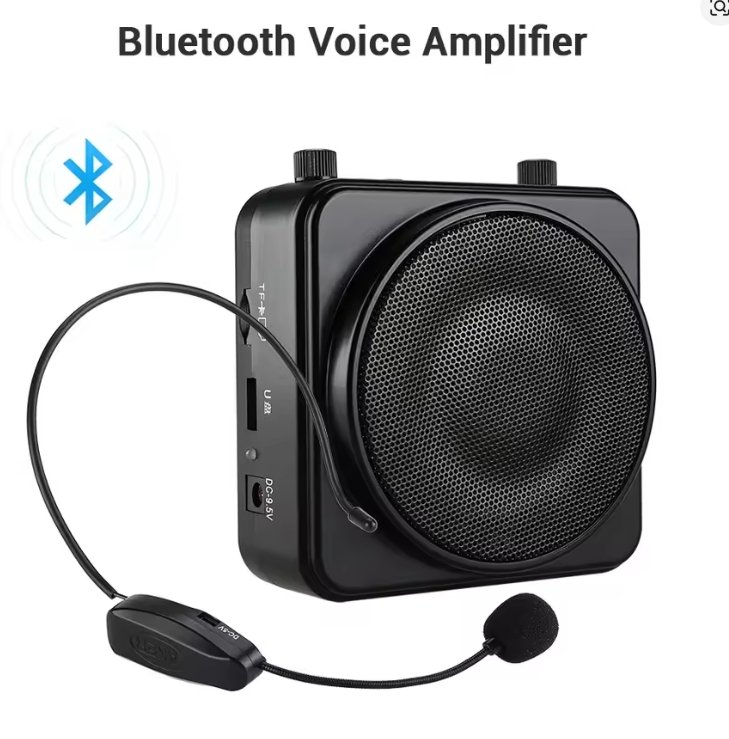
Hello and welcome, I've been using an Aker amp and Icomm static burst unit for years without issue, occasionally you need to replace the Icomm battery (cheaper option update) There are other amps too which allow you to play background tracks (chatter) while still using the microphone, as well they have wireless headset, I've just invested in one for another project I'm working on, here's one of those Lots of options, really depends what setup is best for you, price, shipping and of course availability
-
File Name: Star Wars Fruits Designer: Islafox10 Last Update: 21/10/2025 File/Link: https://makerworld.com/en/models/1905669-star-wars-fruits?from=search#profileId-2042958 Description: I bring you three fruits from a galaxy far far away! The Meiloorun, a somewhat common fruit, though never found on lothal. The Jogan, a very common fruit found throughout the galaxy. And the Terateak Pod, a rare fruit found only in the wilds of Batuu. Images:
-
- 3
-