Leaderboard


Popular Content
Showing content with the highest reputation on 12/06/2021 in Posts
-
Both challenging and FUN!!!! I submitted pics to Garrison Titan today!!!!! ROTJ blaster cuz it is the only one I have finished! LOL! Thank you all for the help on this adventure and I hope to troop soon! Now to the weapons locker!2 points
-
Ahhh, the joys of having a one-room-apartment please don't fall down the stairs, please don't fall down the stairs, please-2 points
-
Hi folks! So I've had several questions regarding how I did my helmet lenses and so I thought I'd put a little guide up for anyone that may be interested in the process I used for their own builds. I think it came out rather slick with a neat end look while being solid and easily replaceable. Here is a shot of what this technique looks like when completed from the inside: Materials: Sugru moldable rubber Shade 3 flexible welding visor - https://www.amazon.com/gp/product/B00209I0UG M3x20mm screws and acorn nuts Index cards Pencil Xacto knife Micro ruler Scissors 220 grit sandpaper Drill Dremel and/or belt sander Vise Thin black heat shrink tubing Step 1: Create eye socket templates I don't have a picture of this first step but you see me using mine in later steps. So all you do here is take an index card, ho ld it flush over the eye opening inside the helmet then with a pencil trace the opening from the outside. Make sure it is centered on the index card because you are now going to extend it for overlap margin. With the socket outline traced on the card, using a ruler measure half an inch out from the outline and place a mark, do this many times tracing around the outline so you're basically making the original socket outline half an inch larger on all sides. Then simply draw a new line around this outer outline and cut the template out with a scissor. Make sure you label what eye socket each label pertains to, and store these for future needs even after this project is done in case you want to cut new replacement lenses, switch out colors, etc. Step 2: Shape a rubber mounting surface In this next step you are creating a rubber mounting surface that the lenses will bolt onto and create a flush connection to the eye sockets. Take your Sugru (I used like 5-6 packets per socket) and create a nice think outline around the whole inside of the socket. You'll want to ensure that the rubber around the socket's plastic mold is slightly taller so when you rest a lens onto it is sitting flush on the rubber bed. You have a lot of time to work with the rubber before it starts to set so take your time and get the outline right. Important last step here, after you're happy with the rubber mount take an index card (or two to make it thicker), lay it against the rubber outline and press down lightly to ensure that you have an even surface all around to avoid having an uneven mounting surface outline. Step 3: Cut your mounting bolts I used five bolts per lens, you may want less or more but found that to be a happy place for getting the connection tight. Ok so here you are going to take your M3x20mm (you don't need to use this specific bolt size, can be M4, M2, whatever, just something you're happy with size wise) and cut them so you have a set that will have even height protruding upwards from where you will be mounting them. The gist is you will be adding these bolts to the rubber mold you created in step 2 with more rubber, but first you need to look at where each bolt is going to rest and measure how far over the rubber they are sitting uncut. Since the topography of the helmet here varies, some bolts will be extending quite far, others not so much, and you want an even extension from all bolts. I wanted about 8mm of extension to bolt into so I held a screw in the place it will be mounted, measured how far above the rubber it sticks out to calculate how much I needed to cut (so if it stuck out 13mm I cut 5mm off). Keep track of where these screws are going to be mounted since you measured it for that spot! As I was measuring and cutting, I placed them on my templates at the spot they will be mounted. To cut them down I just put a nut on the screw exposing the amount after the nut equaling how much needed trimmed, then put it on a vise and dremeled that excess off. You may find a cutting solution that works better for you, but I found that easy. Careful handling these little bolts after cutting them, they will be very hot! NOTE: Never cut metal bolts that are already mounted in your helmet, besides making a mess their heat will likely melt the plastic creating a huge problem. Step 4: Mount your bolts Now that you have your rubber mounting surface and your bolts cut for specific locations around the surface, it's time to attach the bolts. Using Sugru again put a nice wad on the bottom of the bolts, then just mold them to the mount at the correct locations where they were measured. Get the attachment between the mount and the bolt nice and tight, use more Sugru liberally and work it in. The one thing to be careful of is to not have any Sugru on the bolt that goes over the height of your mounting rubber from step 2, otherwise the lens will stop bolting in too high and not rest on the flush surface you created. However, being rubber this stuff can very easily be trimmed with a Xacto knife, so you can just snip any excess off to keep your base mount surface flush. After you've finished mounting all your bolts, you may want to double check you didn't get rubber smudges on your helmet and clean it off well, don't worry if you do, it will remove without much effort. Clean your hands thoroughly as well! Now that you have your cool rubber mount with sized bolts, you need to let that rubber set for 24 hours. Step 5: Add mounting points to your templates After you've allowed your rubber to set overnight, you'll be taking your two socket templates and marking where the bolts you mounted relate to it. Simply press the template down onto the bolts to make impressions on the paper where the bolt tips are, then punch through those holes with a pencil. Afterwards, place the paper template into the actual bolts to ensure that all the bolts align right with your template and your template rests nicely into the mounting surface you've created. This is a preview of what your lens will look like when you cut them to the template shape and drill the holes! Step 6: Cut and shape the welding lenses I used a shade 3 welding lens which is flexible and fairly easy to cut, after looking around and trying a few options I found the one linked above in the materials list to be the best for this project. Ok so what you're going to do now is rest your templates onto the lens stock, trace the outline lightly with your Xacto knife (just enough so you can see where you need to cut), then cut out each shape with your scissors. Your cut lens will be a little rough, so curve it more naturally by (carefully) running it down a belt sander or Dremel tool. You just want to make the shape of the lens natural and curve to make the template and avoid any sharp points (your eyes don't like sharp points). After that, take some sandpaper and sand the edges all down nicely so they are nice and smooth. For the last step, place your paper template back onto the cut lens, then with the Xacto knife mark where each hold is going to go. Take your drill and open up each hole, making them plenty big enough for the bolts to go through with some room for flex, but not too large that your acorn nut won't compress down against it. Note that while doing all this, be careful not to scratch the lens surface by a stray cut or tool. Step 7: Mount your lenses Ok almost there! Here you simply need to push the lenses down through the bolts and screw in your acorn nuts to secure the lenses down into place. You may need to bend the lens a bit to get the fit to work, here is where making those holes a little bigger than needed helps. Whatever you do, try to not allow the tops of your bolts to scratch your lens. To hide any excess exposed bolt shaft I cut very small pieces of black heat shrink tube and put them on the bolts then put the acorn nuts back on and screwed down tightly. Conclusion: Ok so this may not be the easiest method of creating and mounting lenses, but the end result is pretty nice (in my opinion), and I like the effect having the acorn bolts gives. You have a well sealed lens over your sockets without any gaps by virtue of the rubber mounting surface and bolts securing them into place. The lenses themselves aren't flimsy and are high quality, plus easily cleaned with mineral spirits if heavily soiled, or just your standard glass wipes. Another plus is you can easily replace them just just unbolting them! I hope this guide helps anyone interested in this type of technique, cheers!1 point
-
He does custom sizes, or did do, you can message him to check via website https://crowprops.bigcartel.com/contact or FB https://www.facebook.com/groups/108653819216581/user/1797631775/1 point
-
You could try CrowProps https://crowprops.bigcartel.com/product/jhodpur-tk-white-short-boots1 point
-
Thanks guys! 50 th is in March next year, just pre-planning. LOL Like the ink Glen! I was going for something simple like this (stolen from web), like I was branded aboard a Star Destroyer... After I get my ink my wife will recreate this shot. My letters and numbers will be in Aurebesh.1 point
-
Thanks I’ll give this a try! Sent from my iPhone using Tapatalk1 point
-
1 point
-
Hi, Jessie and thank you for your EIB application. Your submission has been added to the D.O. processing line and one of us will be with you Shortly, meanwhile , could you please add the following couple of photos ? 5. ___ Left side detail (arms raised showing ab/kidney connection clearly) 6. ___ Right side detail (arms raised showing ab/kidney connection clearly) 12. ___ Close-up of ab/kidney rivets Thank you.1 point
-
Good luck, hope you hear something soon, no matter how many costumes you build everyone is nerve racking until you hear good news1 point
-
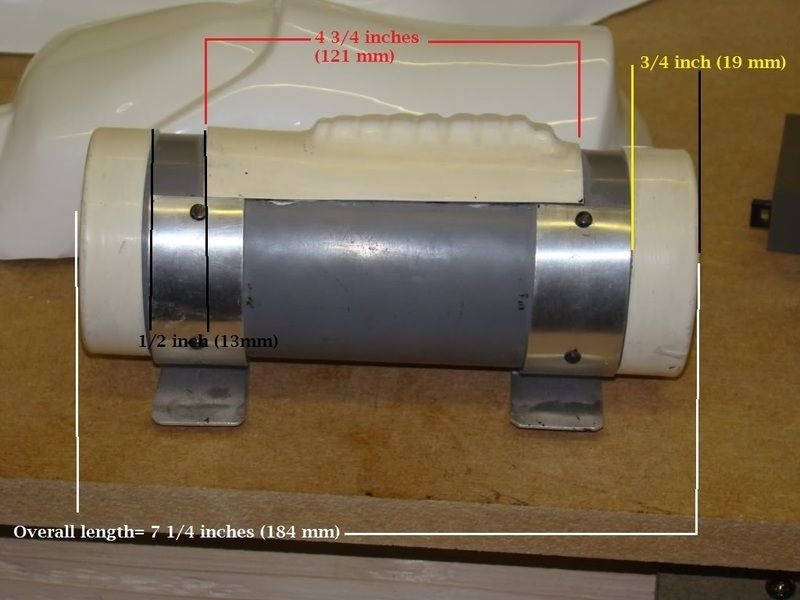
Just check your end cap widths and also the gaps between them and control panel
 1 point
 -
Decided to trim the return edge off the bottoms of my bells today. Also, I attached @justjoseph63's awesome looking flexible hand guards onto the set of rubber gloves that came with my kit. I may have went a little overboard. Instead of using a “Heavy Book” like he tells us to do, I used a table instead. Sent from my iPhone using Tapatalk1 point
-
Hi Matt, and thank you for your application for ANH Stunt Expert Infantry! CRL and EIB Application Requirements All required photos are now in and, after review, we are pleased to welcome you to EI! On behalf of the entire DO staff, congratulations!! Other-Armor Fit/Assembly In this area we review observations made by your fellow troopers and the DO team. Some observations may lead to suggestions to improve the overall look of your armor. Note that we consider both text (CRL) and pictures (screen caps/reference images) when reviewing submissions. First of all, as a taller Trooper you did a SUPER nice job on making this armor fit great! Excellent work, sir. Secondly, please don't be alarmed at all the photos below. You nailed a lot of great details, but we have a few suggestions for ya' to help give you a better overall look. That being said, let's jump right in! Unless it is permanently glued down, we suggest that you lower the center of the brow trim a bit, as it seems to have an arch. As seen in the reference image, most had a more horizontal look. Reference image In a perfect world, the biceps should sit underneath the shoulder bell. We realize that because of your height this may be difficult, but you should be able to raise them an inch or so by shortening the strapping. It may also help to remove all of the return edge from the bottoms of the bells (pic 3) so that they don't butt up against the bicep. This will also allow them to sit closer to the bicep, and as seen in the second reference image many of the originals had little to no return edge. 1. 2. 3. Reference images Technically your ABS belt is correct- the bottom sits ".. at or just above the bottom of the ab button panels" but it could come up half an inch for a better look. We also noticed that when you raise your arms it slips down (second photo). Some Velcro on the rear would take care of that perfectly! Reference images Just a small detail here, but if you have the time and inclination your small ab-button plate could do with a trim. Reference images Centurion Requirements In this section we prepare you for Centurion. More photos may be requested in the future that allow us to make better decisions on possible adjustments. If there are any areas of concern they will be discussed here. Because Centurion photos show much more detail than EIB, items to pertaining to Centurion might be seen there and not here. We try to point out all that we can from what is seen, but the final accuracy is the responsibility of the trooper. Since Centurion is the highest level of approval we have, this is the area where we go into a lot more details. Some of these will be relatively easy fixes, and a few will be more challenging. BUT, after looking at your build skills we feel completely confident that you can do it... and we can help! Keep in mind that in addition to the actual CRLs, we consider screen caps/reference images when approving at higher levels. As per the CRL, for Level 2 the tube stripes are "Ideally" located approximately a pencil width from the cheek. The right side is VERY close, but for L3 the left side needs to come in more. Reference images An easy fix here.. Just grab some black paint and extend the first 2 ribs of the vocoder up a bit. Reference images Although they could very well be there and we just can't see them in the photos, a thin (like ¼ inch) white elastic band is required to hold the shoulder bridges down. Reference images A quick strapping issue here: Again, we realize that you are a taller Trooper and we certainly do make exceptions in some cases, but if possible we would like to see the shoulder bells raised to where the tops are closer to the shoulder bridge. This would help minimize the gap(s) between them and the chest / back plates, (and another reason to raise the biceps). reference images Now for the most difficult issue: As you are probably aware, when using shims, the outside seam must be flush for Level 2. Looks like you got that part covered! For Level 3, however, the seam will need to be filled. It doesn't have to disappear 100%, but it should not be overly apparent. Some ABS paste and an hour or 2 of your time would make this look spot-on, and there are a few tutorials here on that exact issue. The CRL for Level 3 states that "Ideally there is no gap between the abdomen and kidney armor". The key word there is "Ideally". As I mentioned, we make allowances, but we would like to see them a bit closer if possible. Maybe just a matter of tightening up the canvas belt. The screws on your TD are the correct type and in the right positions, but unfortunately they are way too large and will need to be replaced. I can send you set of the correct ones (no charge and I'll even pay postage, just PM me). Note that because of the shank diameter being smaller you may have to glue the clips to the TD and glue the new screws in. Easy peasy. Reference image As per the CRL, "The corners of the plastic ammo belt shall be trimmed at a 45° angle that meets the outer edge of the cloth belt". You have a distinct advantage here because of where your square belt buttons are placed. All that is needed in your case is to trim the ends as shown below. 4 minutes with a razor knife and you are golden! Reference images After you trim the ABS belt ends, we need you to bring the drop boxes out to where the outside edge is in line with the outside edge of the ABS belt. Just move the strap(s) over and add a dab of E-6000 behind the elastic to hold them in place. Raising them up a tad to where the tops of the boxes meet the bottom of the ABS belt would help as well. As seen in the reference pic, there are no gaps on the lower ridge(s) of the thighs. I suggest gluing a small piece of ABS behind that gap. Filling the gap with ABS paste is optional, but preferred. Just a dressing issue, but the ridges at the top of the left calf should be completely closed, just like your right one. Reference image Last up! Like I mentioned in your thread- that is an AWESOME looking blaster. Many times we see lots of print lines, but we can tell that you took a lot of pride in that build. The only small issue is the silver weathering on the T-tracks. The originals were plastic, so I suggest grabbing some of your black spray paint and giving them a quick coat. And that's it, brother. You have some work ahead of you, but we would honestly like to see you tackle these issues. You have the skills and we are here to help, so I really hope to see your Centurion submission as soon as you are ready. Time to get out there and "shine" as the newest EI in the Diamond Garrison!!1 point
-
I cannot agree more. RS makes a dynamite set of armor no doubt, but we have experienced a lot of ongoing issues with their commission builds for quite a while for those aiming for Centurion. Dan will not steer you wrong, though!1 point
-
Sorry to hear that, hopefully back at the armor may take your mind off things, looking forwards to seeing your progress.1 point
-
I've seen members do a better job with assembly than RS, you can use their tutorial as a guide but I'd follow Dan's @CableGuy builds for sure1 point
.thumb.jpg.6d328112c293e966a129e9e62a88b910.jpg)