Nairy
-
Posts
2,031 -
Joined
-
Last visited
-
Days Won
58
Content Type
Profiles
Forums
Gallery
Articles
Everything posted by Nairy
-
Welcome to the ranks Rick!
-
 The only thing I reacted on was the belt pic, the drop boxes gets hidden by the cloth a little bit!
 -
Hello Shane! Congratulations on completing your armor! You contact your local Garrison and send in your approval photos as will be requested by them! When you are approved, you come here and request trooper status in this thread below: In that way, you'll be able to purchase detachment merchandise when it launches next time! Let us know how it goes and we can assist you further!
-
TK-19525 Requesting ANH Stunt Centurion Status [RWA] 541
Nairy replied to Tall_Trooper's topic in Request Centurion Status
Oh my congrats Torben!!! Missed this too it seems! -
Hello Dave! Congratulations on your approval and first troop! Glad to have you in the ranks!!
-
Hello Freddy and welcome to the forum! Have a look at this thread, and scroll down to the Rogue One section!
-
Hello Andreas! You look amazing already!
-
Hello Ronald! Welcome to the forum!
-
Welcome Max, glad to have you here! Great that you've gotten in contact with the Welsh Squad already! Here's a very helpful thread to get you started!
-
Hello Steven and welcome to the forum!
-
Whilst wet sanding as the prep for painting, you can also pause there for a moment to see if enough white comes back by the wet sanding alone - and if it does, skip the painting if you feel like it's enough!
-
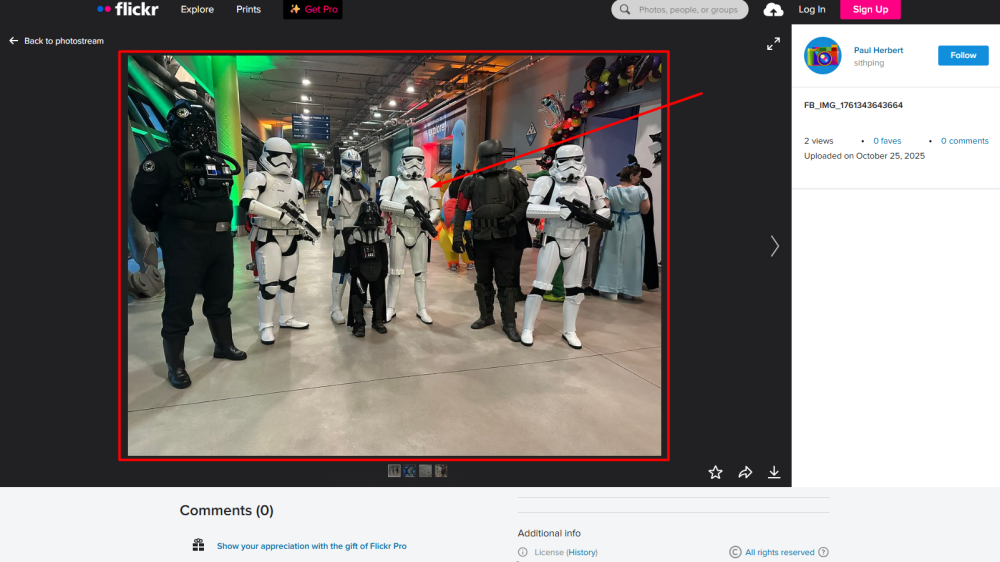
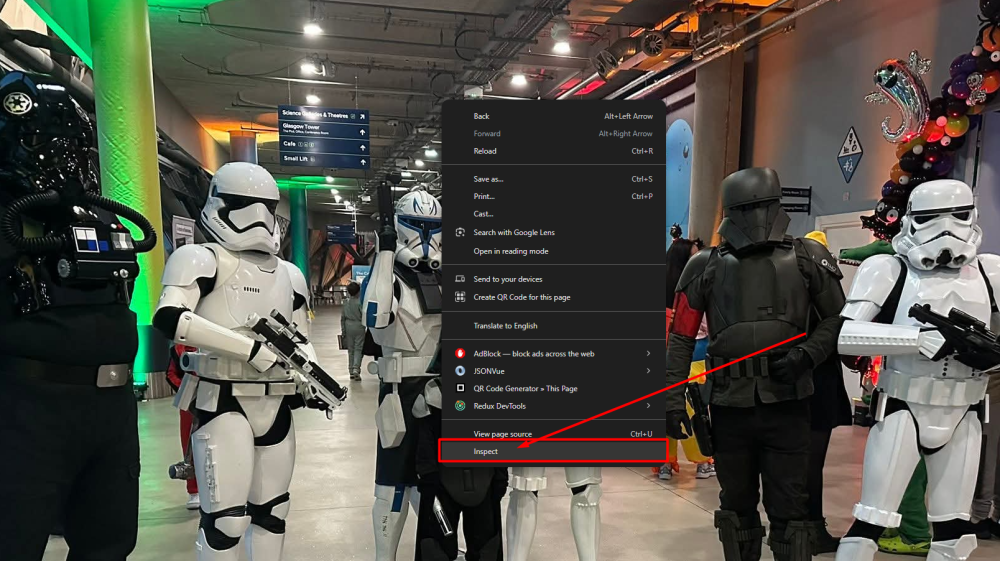
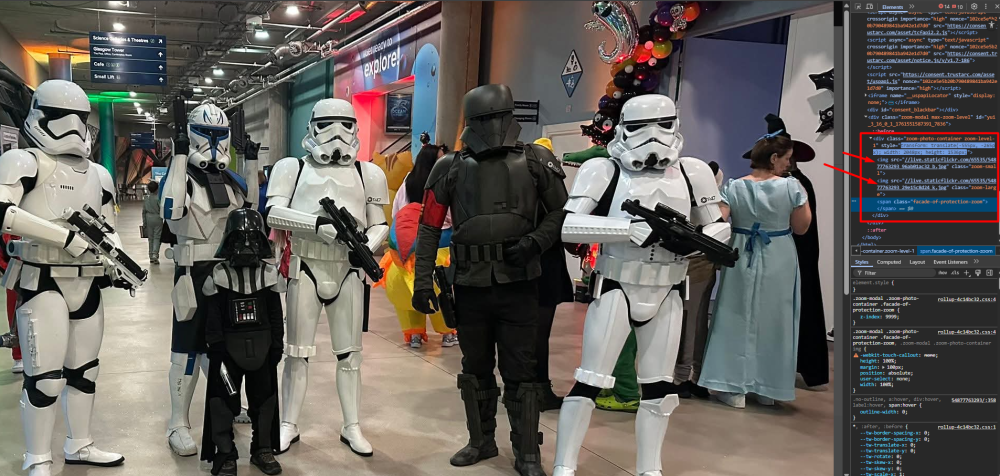
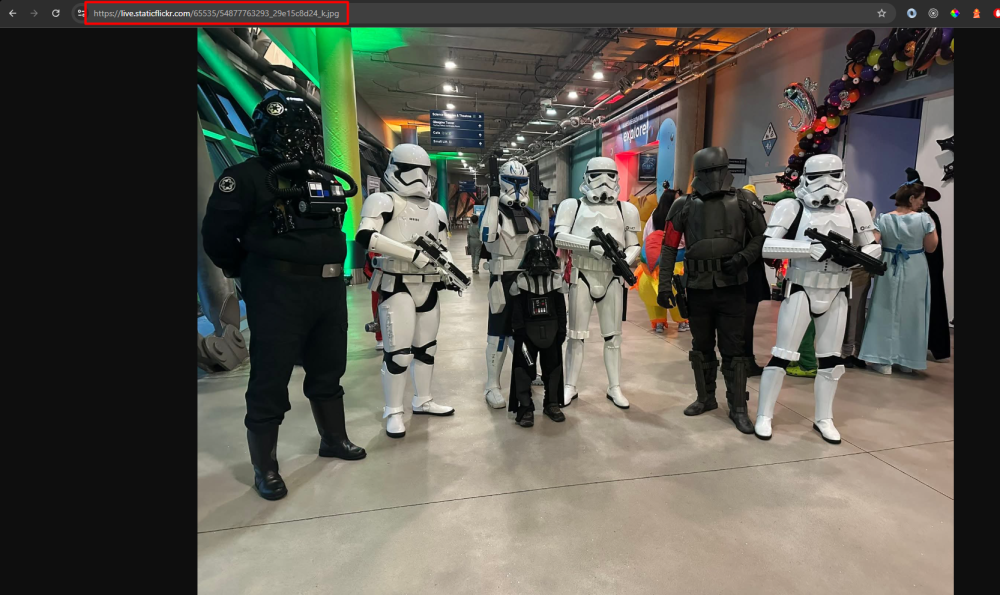
With imgur currently being blocked in the UK because of the data investigation that is going on, there is a way that you can get your photos into your posts! Some background information: What the forum needs to display an image in posts For an image to be displayed in posts on the forum, it needs an image url. When we drag images from our device into a post, the forum itself uploads that image and becomes the "host" of the image. We used to have very limited storage allocated to each account on the forum, that's why using imgur on the forum became a thing in the first place. When you upload an image to any platform e.g. Flickr, that platform becomes the host of your image, you take up storage on their servers. Every image has a link to where it can be accessed, this is called the "Image url". It's this "Image url" that we now need to go fetch from the Flickr platform, lets go!! We need to do a little more work here compared to the imgur tutorial, so sit down and get comfortable! Getting the Image url On your Flickr post. Click on the image you want to add to the forum - to zoom it. Right click on the enlarged image and press on "Inspect". This will open up the enlarged container, it holds the thumbnail image (the first in this container) and the original image (the second in this container). Double click on the second img src link to mark it, and press Ctrl+C/right click and choose "Copy" Open up a new tab in your browser, and paste the link in the Address bar. This will append "https:" to the front of your image url, since the image url that we copied in stage 4 just started with "//". Final step, copy the url from the Address bar and paste it to your post, and voila - you have an integrated image from Flickr! TL;DR (condensed version without images) On your Flickr post. Click on the image to zoom it. Right click on the enlarged image and press on "Inspect". This will open up the enlarged container Double click on the second img src link to mark it, and press Ctrl+C/right click and choose "Copy" Open up a new tab in your browser, and paste the link in the Address bar. Final step, copy the url from the Address bar and paste it to your post Thank you to Paul @Sithping for being the involuntary example in this guide! Example image from this troop log.

-
Hello Alex! Glad to have you here!
-
A personal note: I love my kit from @ukswrath since the sound comes directly from the helmet itself through the HOVI mic tips, and everything fits nicely in the helmet. I never have to fiddle with wires or anything, just put the helmet on and turn it on!
-
Hi John! Glad to have you here!
-
Hello James and welcome to the FISD Forum! Glad to have you! To get you started, here is a very good thread with a lot of info! Remember, measure twice cut once, and start a build thread on the forum if you want help from us along the way! Don't stress, is probably the best tip I can give you!
-
Request edited Signature banners/Profile pics/Fire Team Logos (Active)
Nairy replied to Nairy's topic in Forum Help & Support
Enjoy your new banner @TookBreaker!!! -
I think the background is great for editing, but I agree with the reflectins, there is a lot of yellow light!
-
Request edited Signature banners/Profile pics/Fire Team Logos (Active)
Nairy replied to Nairy's topic in Forum Help & Support
Enjoy your new banner and profile pics Evon! If you need help adding them to your profile, don't hesitate to ask! Troopers helping Troopers! -
Sweden's best builder!
-
FREE FISD, EI and Centurion patches!
Nairy replied to justjoseph63's topic in Request Expert Infantry Status
Wow Joseph! Thank you for offering this generous gift to our members! Now go achieve EIB/Centurion, troopers!- 1 reply
-
- 2
-

-
Hello Jorge and welcome to FISD!
-
Hello from Daytona Beach! Anyone Nearby?
Nairy replied to larryebaum's topic in New Member Introductions
Hi Larry and welcome to the forum! If you check the Attaché list, you'll find the people that are FISD representatives in Florida and they could hopefully set you up with someone local in FL! FLORIDA Florida Garrison Tampa Bay Squad Ken @PiettLives Tampa Bay ANH-S, Trooper Academy CO ** ** ** Chuck @TK 33773 Tampa Bay ANH-S ** Everglades Squad Tarkan @TookBreaker South Florida ANH-S/ESB ** Makaze Squad Mike @msouza Windermere (Orlando) ANH-S ** ** ** Parjai Squad Needed -------- ------ Squad 7 Doug @DUGJAX ANH-S, GML ** Joseph @justjoseph63 Live Oak ANH-S/ANH-H/HWT, Former Attaché Ambassador, DO, XO. DL ** -
Congrats on your purchase Preston! Welcome to the FISD!